
There are several routes to onboarding students and guardians that may be explored depending on your organisation's needs.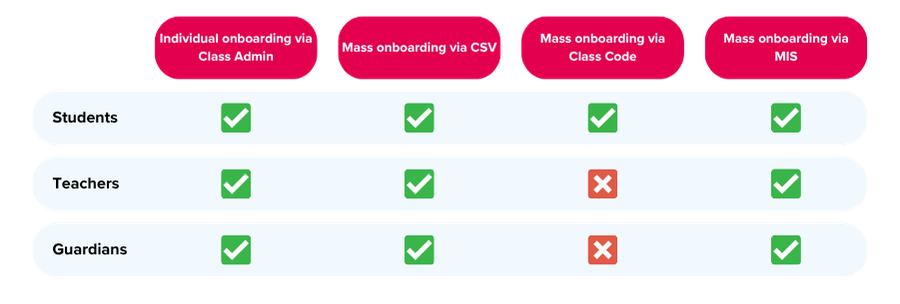
Individual Onboarding
This method allows teachers / MIS managers to onboard individual users via Class Admin.
This route of onboarding is recommended for smaller organisations where you may wish to onboard users to the platform ad hoc, but may prove very time-consuming if you wish to add a large number of users.
Click here to learn how to add an individual student to CENTURY, or here for instructions on adding a teacher account.
For instructions for how to onboard individual guardians, please click here .
Mass Onboarding - CSV
This method allows MIS managers to onboard multiple users in a single CSV file upload, which is recommended if you wish to onboard all of your organisation’s students, teachers or guardians at once.
To learn how to mass onboard students and teachers to CENTURY, read our help page here. For instructions on onboarding guardians, please click here .
NEW: We now have automated self-service onboarding available, making the process of CSV onboarding quicker and easier. Learn more here .
Mass Onboarding - Class Code (Students only)
A class code will enable students to be onboarded to the platform on-the-spot in the classroom. Teachers will simply need to generate a class code via Class Admin, and distribute the code to students. Students will then use the code to sign in to CENTURY and be automatically assigned to the right class.
Click here for more information on class code onboarding.
Mass Onboarding - Wonde, Groupcall, APIs, etc.
If your organisation is already using an MIS such as Wonde or Groupcall, students can also be onboarded via these systems. Please reach out to your CENTURY Account Manager for support with setting this up.